MakeFlow
Know exactly what to make today.
Open orders become one list of what is still outstanding, and a pick sheet you can print.
Free plan · Paid plans from $5.99 USD a month · Last updated · What's new
Three steps.
- 1
The problem
Open orders sit one by one in Shopify. The same candle can appear on five of them.
- 2
What the app does
MakeFlow totals every open, unfulfilled order by product and variant into one Make Today list.
- 3
The result
Print a pick sheet that groups the lines by order, ready for packing.
Who it is for: Made-to-order makers.
Open orders do not add themselves up
The same product can sit on several open orders, and that count changes as soon as an order is edited, cancelled or fulfilled.
- Adding up the same product across a pile of open orders
- Re-checking the list every time an order is edited or cancelled
- Missing a late order buried in the queue
MakeFlow reads your open, unfulfilled orders and combines them into a single Make Today list, showing how many of each product and variant are still outstanding. Duplicate items across orders are totalled. The list updates when orders are created, edited, cancelled or fulfilled, and fulfilled orders drop off. Add product lead times and each order gets a ship-by date, with Overdue and Ship today filters. Group the list into batches, hold orders waiting on a proof, see part-paid orders, and get a warning when today's work is more than a day's share of your weekly capacity.
From problem to result, step by step
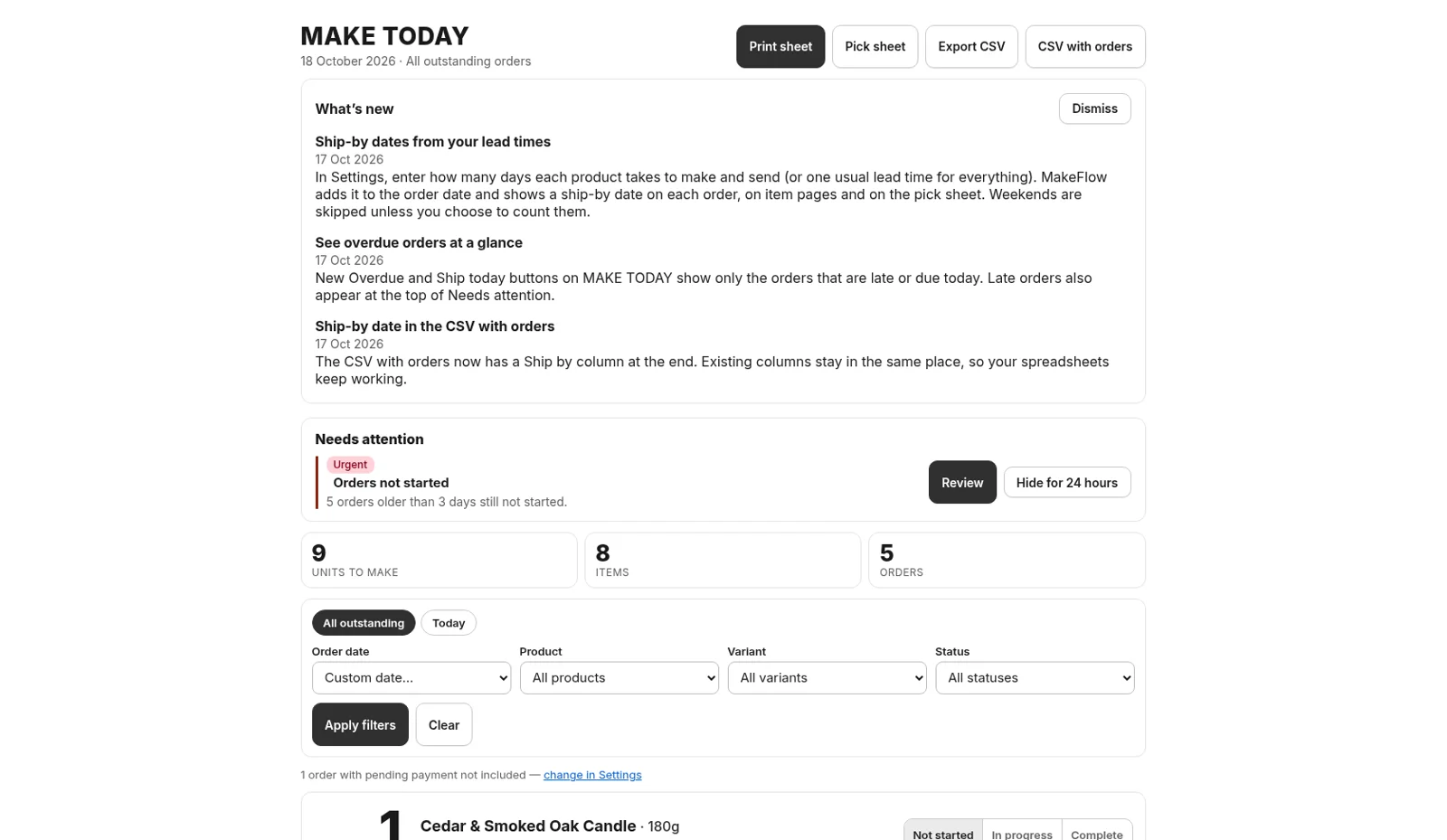
Before Open orders sit one by one in Shopify. The same candle can appear on five of them.
Real MakeFlow screen with sample data, not a real shop.
Action MakeFlow totals every open, unfulfilled order by product and variant into one Make Today list.
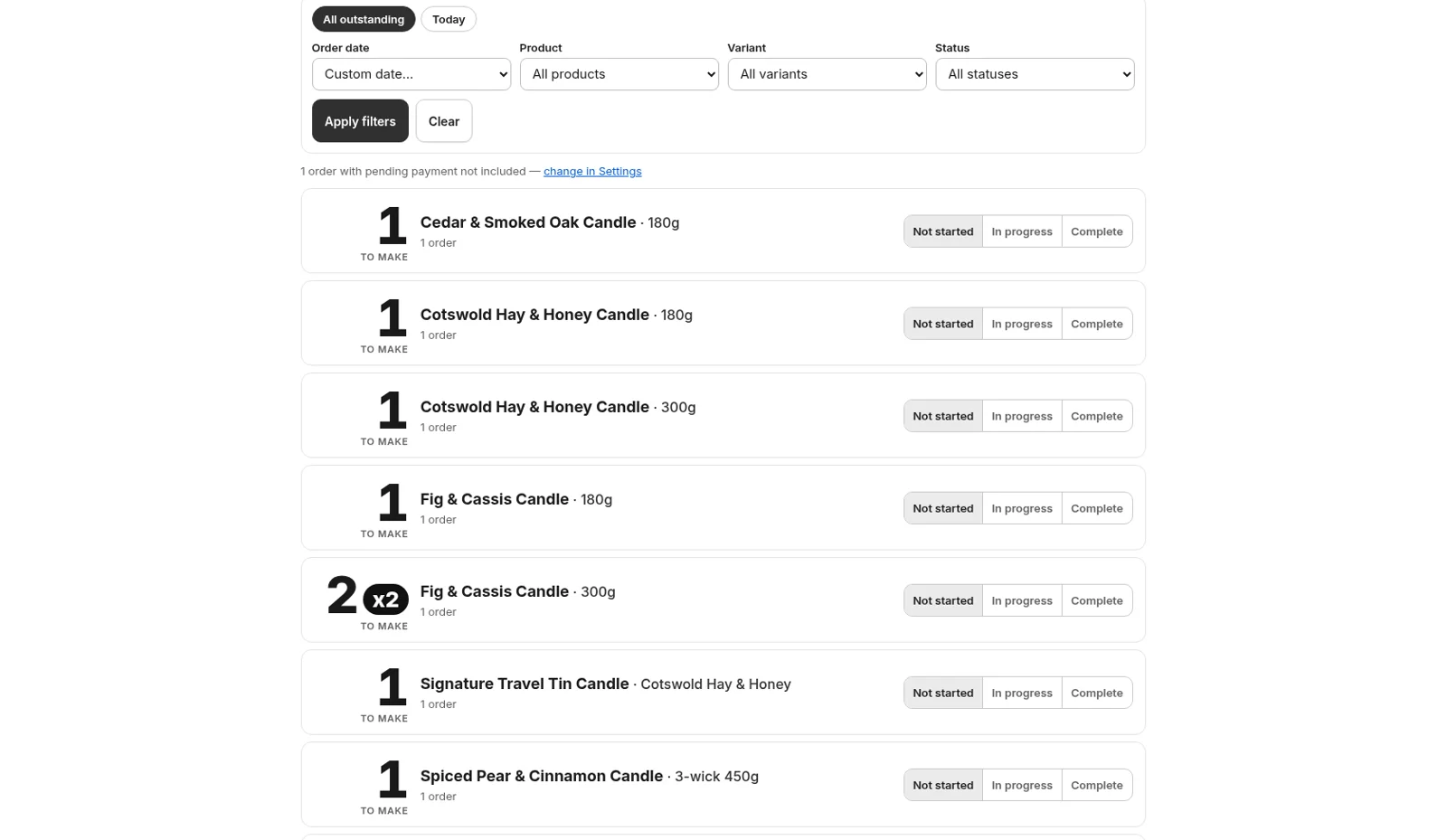
Real MakeFlow screen with sample data, not a real shop.
Result Print a pick sheet that groups the lines by order, ready for packing.
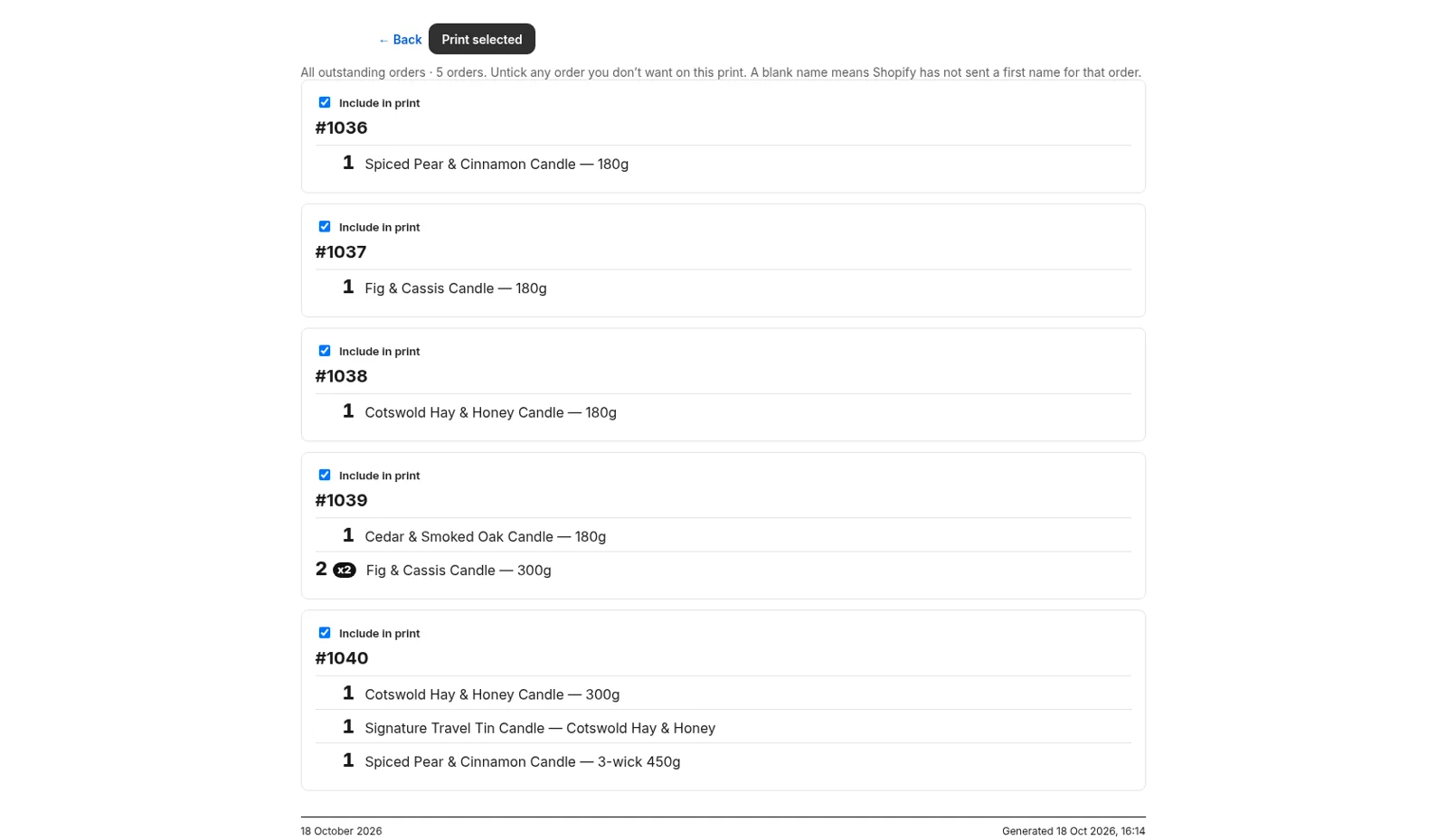
Real MakeFlow screen with sample data, not a real shop.
Result Choose which orders count, and set weekly capacity per product in Settings.
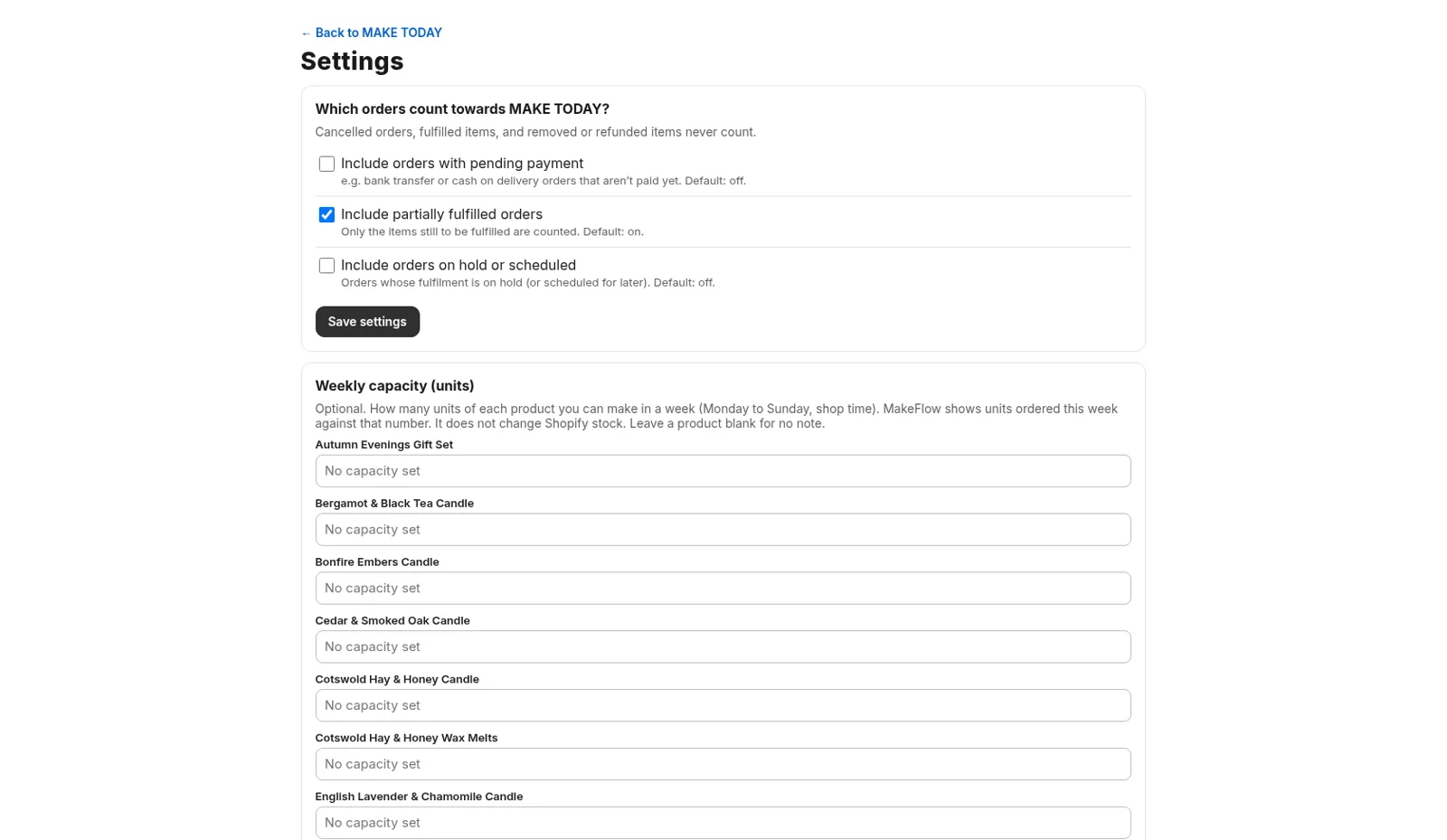
Real MakeFlow screen with sample data, not a real shop.
Watch the walkthrough
Five orders become one list
- #1036 · #1037 · #1038 · #1039 · #1040Five open orders, eight lines between them
- Fig & Cassis Candle 300g×2 on #1039 and ×1 on #1040 → make 3
- Cotswold Hay & Honey 180g and 300gShown as separate variants → make 1 of each
- Order #1037 fulfilledIts lines drop off the list
- Order #1039 editedThe list updates. There is no spreadsheet to redo
Illustrative example in the style of the sample shop in the screenshots.
What it is designed to help with.
Start the day with one list
No adding up across orders before you can start making.
Always current
Created, edited, cancelled and fulfilled orders are reflected in the list.
Print and CSV on the $5.99 plan
Printing the pick sheet and exporting CSV are on the paid plan.
Today's production list from your open orders
Automatic Make Today list
Built from your open, unfulfilled orders.
Totals by product and variant
The same item on several orders is added up for you.
Updates as orders change
Created, edited, cancelled or fulfilled orders are reflected, and fulfilled orders drop off.
Tick off as you make
Mark items done on the list. Printing the pick sheet is on the $5.99 plan.
Ship-by dates
Product lead times give each order a ship-by date, with Overdue and Ship today filters.
Batches and Ship within
Group Make Today by order tag, product type or collection, and show only orders due in the next few days.
Waiting on proof
Keep an order off Make Today until the customer signs off, by button or by tag. Release it with one click.
Part paid and capacity warning
Deposit-only orders are labelled Part paid, and the dashboard warns when today's work is more than a day's share of weekly capacity.
Works with: Shopify orders, Shopify products, Oskivo AI connector
Price, permissions and support.
Pricing
Free
- Track up to 25 open orders
- Make Today list from those orders
- Updates as orders change
MakeFlow
- Printable pick sheet
- CSV export
- 7-day free trial
See the Shopify App Store listing. Billed in USD every 30 days through Shopify. Cancel by uninstalling.
Permissions and data
Reads open orders and product details to build the list. It does not need customer names, emails or addresses for the list.
Full details: privacy policy · trust.
Shopify access scopes
read_ordersread_products
Support
Email support@oskivo.com with your .myshopify.com address. The developer who built MakeFlow replies within 2 working days. How support and incidents are handled.
Who makes MakeFlow
Oskivo, built and supported by a sole developer in the UK. Company details.
Questions
Does the list stay up to date?
Yes. It updates when orders are created, edited, cancelled or fulfilled.
How much is MakeFlow?
The free plan tracks up to 25 open orders. Print and CSV export are on the $5.99 USD plan, billed every 30 days through Shopify, with a 7-day free trial.
Can I hold an order until the customer approves a proof?
Yes. Press Waiting on proof on the order, or choose a tag in Settings. Held orders stay off Make Today until you release them.
How do I get help?
Email support@oskivo.com. The developer who built MakeFlow replies within 2 working days.
Try MakeFlow on your shop
Install from the Shopify App Store. Start on the free plan, or try a paid plan free for 7 days.