OskivoGuidesMakeRep vs spreadsheet
MakeRep · Comparison · Updated
MakeRep vs a spreadsheet for sales rep commission
Most shops start paying reps from a spreadsheet, and for one rep in a quiet month that is fine. This page sets out where a spreadsheet works, where it starts to cost you time, and what MakeRep (opens in a new tab) does instead.
The short answer
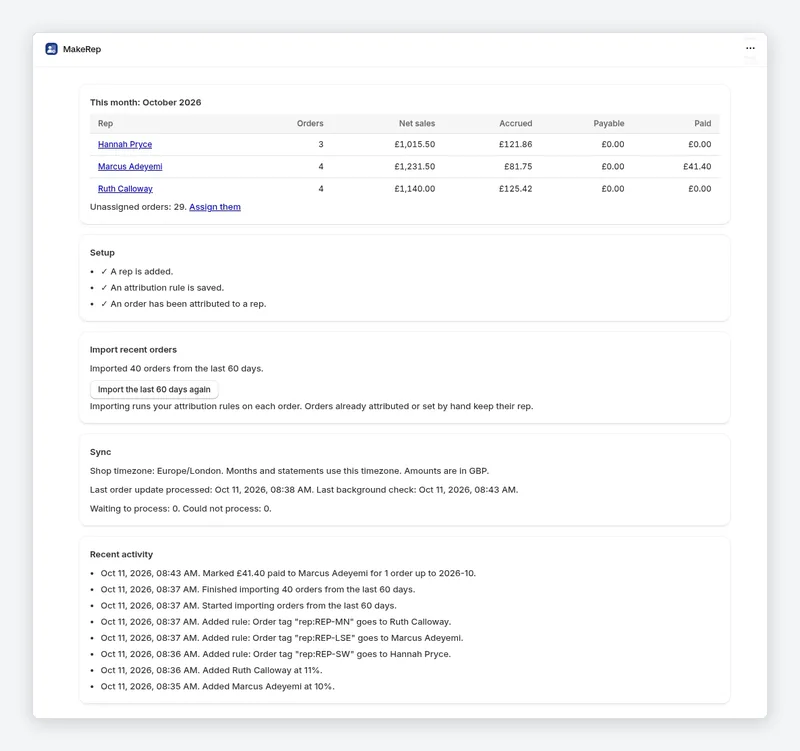
Keep the spreadsheet if you have one rep, a single flat rate and few refunds. Move to an app when you have several reps, rules that could match the same order, product or collection rates, or refunds after you have already paid out. MakeRep is free for one rep, so you can try it next to the spreadsheet for a month and compare the totals.
Side by side
| Spreadsheet | MakeRep | |
|---|---|---|
| Getting the orders | Export orders from Shopify each month and paste them in | Reads new Shopify orders as they come in |
| Deciding whose order it is | You filter by tag, discount code or company by hand | Rules you put in order: B2B company or location, discount code, order tag, sales channel, POS location. You can still set a rep by hand |
| Working out commission | Your formulas, usually on the order total | Per line, from a percentage or fixed amount. Pro adds product, collection and tiered rates |
| Unpaid orders | You check the payment status yourself | Commission becomes payable when the order is fully paid |
| Refunds | You find and subtract them | Refunds reduce commission. Pro adds clawbacks after a payout |
| Statements | You build and send a summary | Pro and Plus: a PDF or CSV statement per rep. Plus: a ZIP of all statements. The app does not email statements; you send them |
| Paying out | Bank transfer you set up yourself | Mark payouts paid. Pro adds Xero, QuickBooks and bank payout files |
| Cost | Free, apart from your time | Free for 1 rep. Pro $5.99/month up to 10 reps. Plus $8.99/month unlimited reps. Premium $12.99/month adds territory reports and tools. 7-day free trial on paid plans |
Where a spreadsheet is the better choice
- You pay one rep a flat percentage of everything they sell, and they rarely see refunds.
- Your commission rules are unusual enough that no app models them, and you are happy to keep the formulas yourself.
- You do not sell through Shopify, or most rep sales happen outside it. MakeRep only sees Shopify orders.
Where the spreadsheet starts to hurt
- Two reps could claim the same order, for example one owns the wholesale company and another gave out the discount code. A spreadsheet needs you to decide every time. MakeRep uses the rule order you set.
- Some products pay a different rate. In a spreadsheet that is a lookup per line; on MakeRep Pro it is a product or collection rate.
- A customer refunds after you have paid the rep. You have to remember to take it back next month. Pro tracks clawbacks after payout.
- Each rep wants a statement they can check. Building those by hand each month takes time.
What MakeRep does not do
To be clear about the limits: MakeRep does not email statements (you download and send them), it only sees orders placed in Shopify, and the free plan shows the current month on screen only. Full history, statements and payout files are on Pro. Unlimited reps, commission on margin, POS staff credit, rep discount codes and weekly rep emails are on Plus.
Oskivo makes MakeRep and MakeFlow, so read this as the developer’s comparison, not an independent review. MakeRep prices are from its Shopify App Store listing on 22 October 2026. Prices are in US dollars as the listings show them, before any usage charges or taxes, and listings change. Check each listing before you decide.
Questions
Is MakeRep really free for one rep?
Yes. The free plan covers 1 rep, every standard attribution rule, a percentage or fixed rate and the current month on screen. Pro is $5.99/month, Plus is $8.99/month and Premium is $12.99/month, all with a 7-day free trial.
Can I keep my spreadsheet as well?
Yes. Pro and Plus give you a CSV statement per rep, so you can check MakeRep’s totals against your own sheet before you stop using it.
Does MakeRep work out commission on the order total?
It works it out per line, so a product or collection rate (on Pro) only applies to the lines it should. Commission on margin is on Plus.
Other guides
- How to track sales rep commission in Shopify
The step-by-step MakeRep guide.
- Shopify sales rep commission apps compared
MakeRep and four other apps, from their listings.
- Commission calculator
Work out a single commission figure in your browser.